Data Licences - Every Licence You Bring, and Never a Missed Renewal

Introducing Data Licences
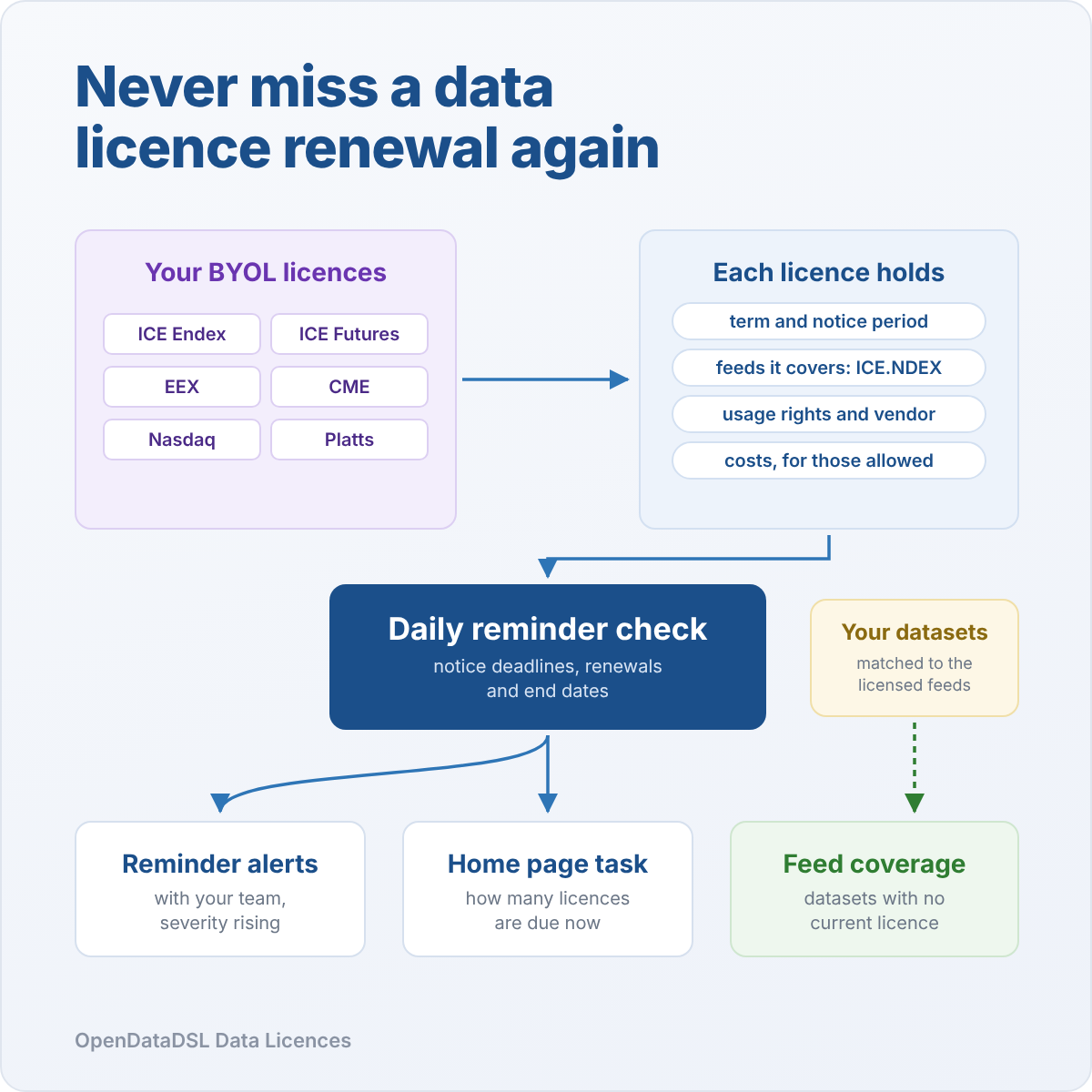
Much of the market data you use on OpenDataDSL comes under a licence you hold yourself, with ICE, EEX, CME or a price reporting agency. The terms that matter most, when it renews and how much notice you must give, usually live in a contract folder and someone's calendar.
Data Licences keeps every licence next to the data it covers. It shows which of your datasets have no current licence, and reminds the right people before a notice deadline, renewal or end date comes round.
The renewal nobody noticed
Most energy and commodity firms bring their own licence (BYOL) for exchange and vendor data. You sign with the exchange, the exchange authorises OpenDataDSL to deliver the data to you, and the data flows every day without anyone thinking about the contract behind it.
That is exactly the problem. Licences renew automatically on dates nobody remembers. Notice periods of 60 or 90 days close quietly, and the chance to renegotiate a price rise goes with them. A fixed term licence runs out and the data keeps arriving, until an audit asks which contract covers it. New datasets get followed without anyone checking whether the licence extends to them.
None of this is hard to manage. It is just spread across too many places. Data Licences puts it in one.
One place for every licence
Open Manage > Data Licences and you see every licence, the feeds it covers, when its term ends and the next date that needs you. Licences that need attention come first: one in its reminder period shows Review, one within two weeks of its deadline shows Act now, and a fixed term licence past its end shows Expired.
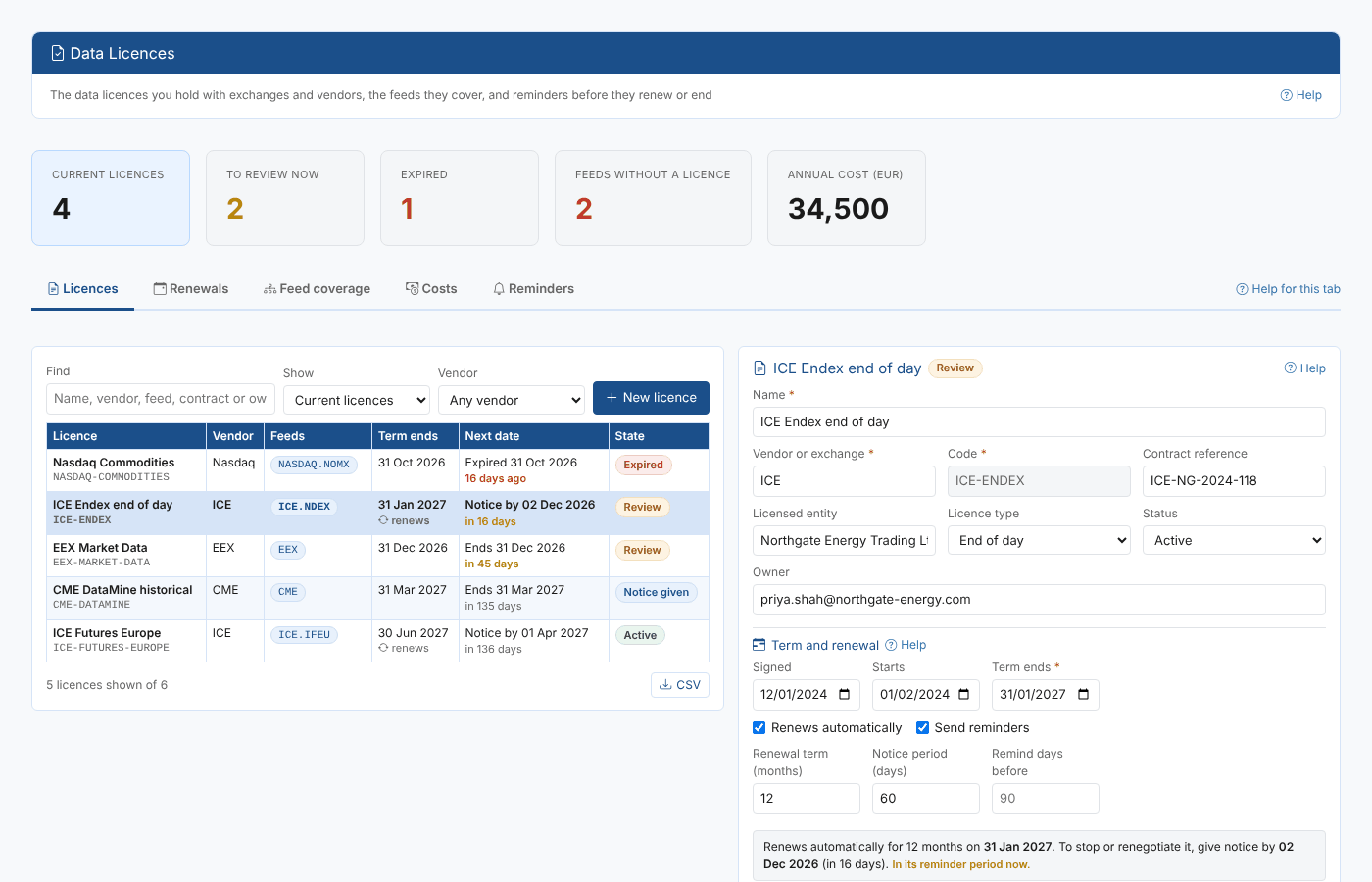
Each licence records what you and your auditors need to know:
- The contract: vendor, contract reference, licensed entity, licence type and the owner who looks after it
- The term: start and end dates, whether it renews automatically, the renewal term and the notice period
- Usage rights: display, non-display, derived data, redistribution and historical use, the number of permitted users and the named users
- The vendor: your contact, and whether the vendor has confirmed to OpenDataDSL that you are licensed
- Documents: links to the signed contract and order forms, wherever you keep them
- History: who changed what, and when
Dates in plain words
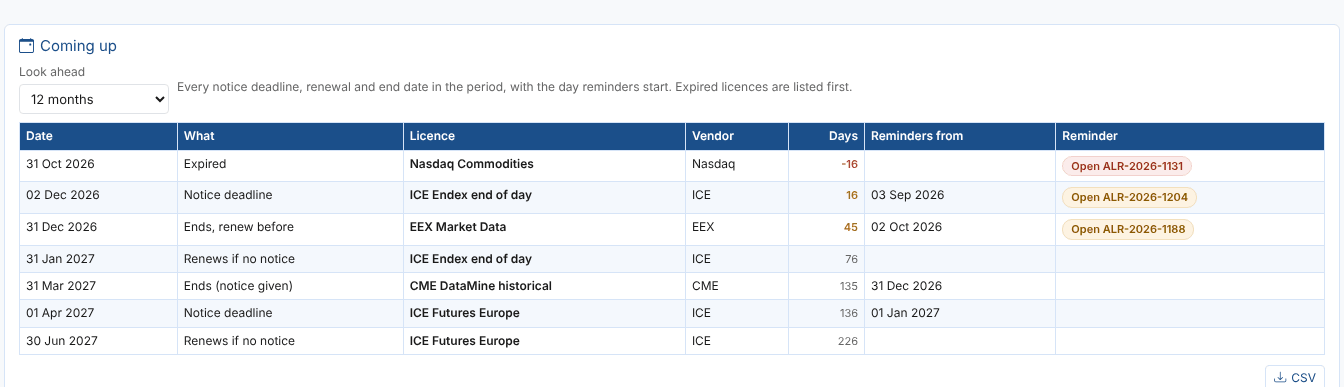
Notice periods are where money is lost, so the licence says in plain words what happens next. Our sample ICE Endex licence renews automatically for 12 months on 31 January 2027 with a 60 day notice period, so notice must be given by 2 December 2026, 16 days away, and it is already in its reminder period.
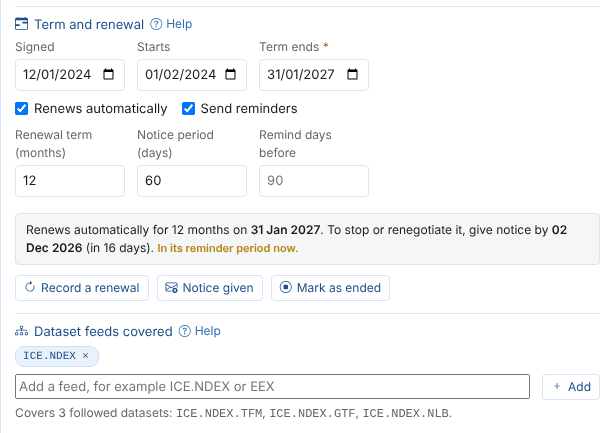
When the decision is made, recording it takes one click: Record a renewal (with the new term end worked out for you), Notice given or Mark as ended. Each is saved with a line in the licence's history.
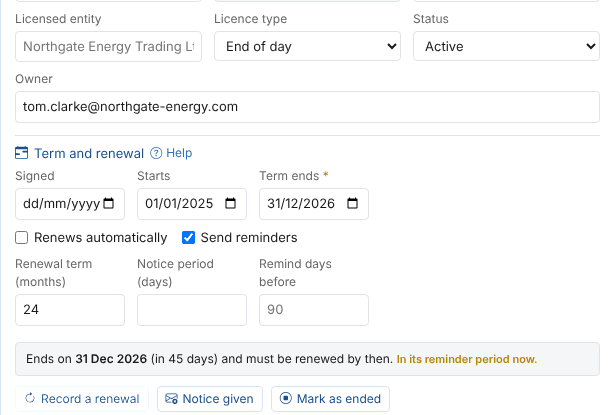
The Renewals tab lists every notice deadline, renewal and end date for the next 3 to 24 months, with the day reminders start and the reminder already raised. Download it as CSV for procurement or finance.
Reminders that find the right people
A daily check looks at every licence and raises a reminder alert when a deadline is coming up. The alert says what to do and by when, with the contract reference, the feeds and the owner, and its severity rises as the deadline gets closer. When you renew, give notice or end the licence, the reminder closes itself at the next check, with the reason.
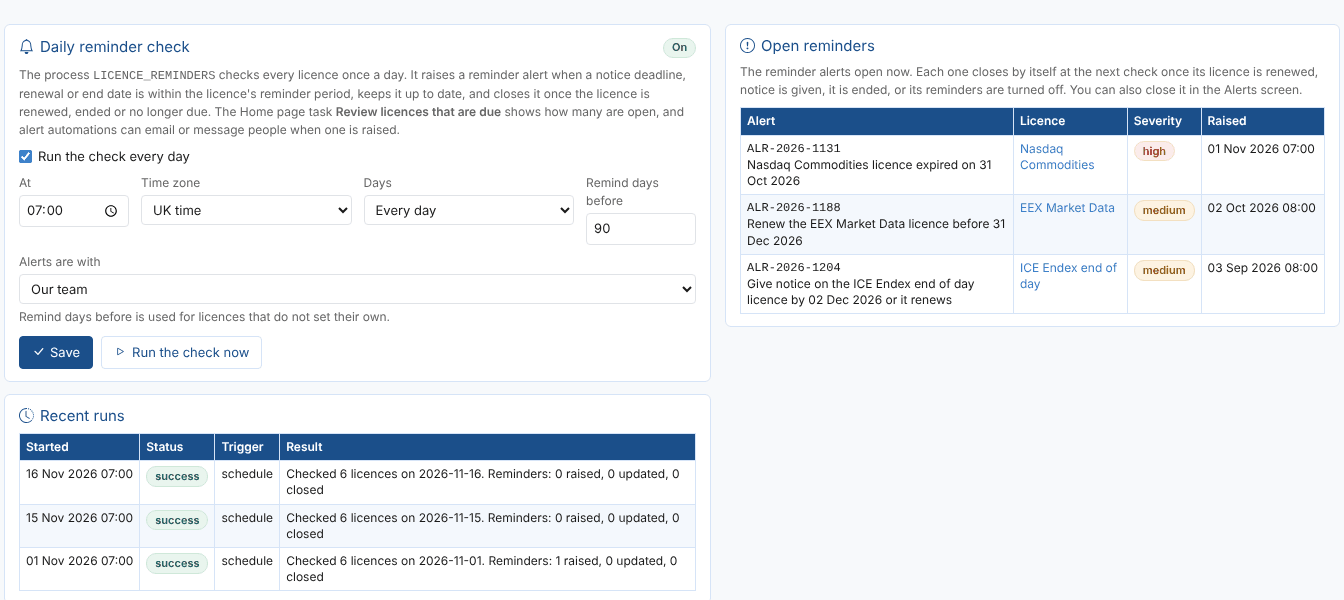
Because they are ordinary platform alerts, reminders work with everything alerts already do. They show in the Alerts screen, an alert automation can email the licence owners or message your team, and the Home page task Review licences that are due shows how many are open and moves to the top while any are.
Which data is actually licensed?
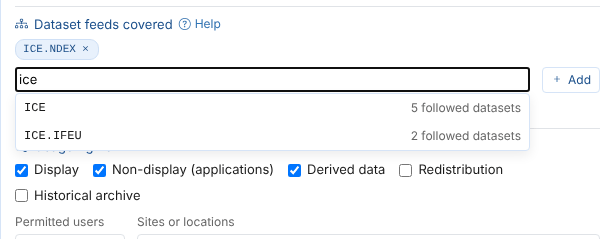
Each licence names the feeds it covers: a provider such as ICE, or a provider and feed such as ICE.NDEX for ICE Endex. As you type, you see the feeds of the datasets you follow and how many datasets each one has.
The Feed coverage tab turns that round. It groups the common and public datasets you follow by feed, and shows the licence that covers each one. Feeds with No licence, or only an expired one, stand out, and a single click starts a new licence with the feed already filled in. Data that needs no licence of yours, such as free ECB reference rates, can be marked as such.
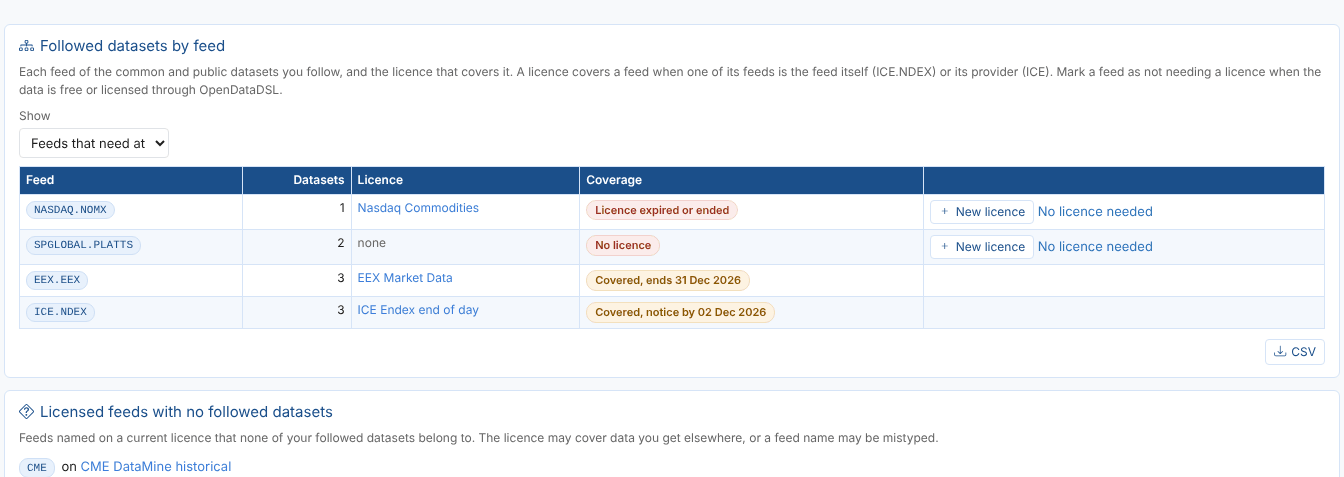
It is the answer to the question an exchange audit always starts with: show us the licence for every dataset you receive.
Costs, for the people who should see them
Licence fees are optional, and kept apart from the licences themselves. Record the annual fee, billing, next invoice, renewal uplift, PO number and cost centre, and the Costs tab gives the annual cost by currency, the fee per permitted user and the next invoice due.
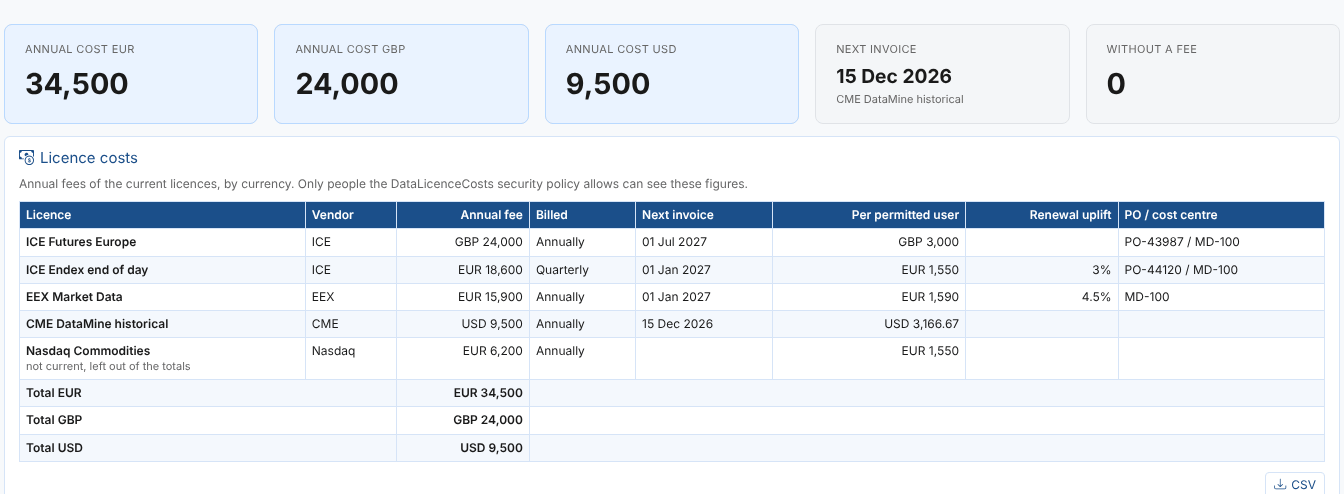
Costs have their own security policy. Limit it to your finance team and the licence owners, and everyone else sees the licences without a single figure.
Getting started
Data Licences is available now as an extension for OpenDataDSL customers. Install it, open Manage > Data Licences, record your first licence and switch on the daily reminder check on the Reminders tab.
The documentation covers everything in detail:
Every licence you bring, in one place, and never a missed renewal.
OpenDataDSL - Go Beyond the Basics.
Next steps
When is your next licence renewal, and how much notice do you need to give?
Send us your list of data licences, and we will load them with you and show you your first renewal report.
- Contact us at info@opendatadsl.com
- Sign Up today and become part of the OpenDataDSL community!
- Fill out the form below, we will contact you to arrange a personally tailored demo.

How about a demo?
Our team is here to find the right solution for you, contact us to see this in action.
Fill out your details below and somebody will be in contact with you very shortly.