OpenDataDSL
Data Loaders
Get any source into the platform today, and on a schedule
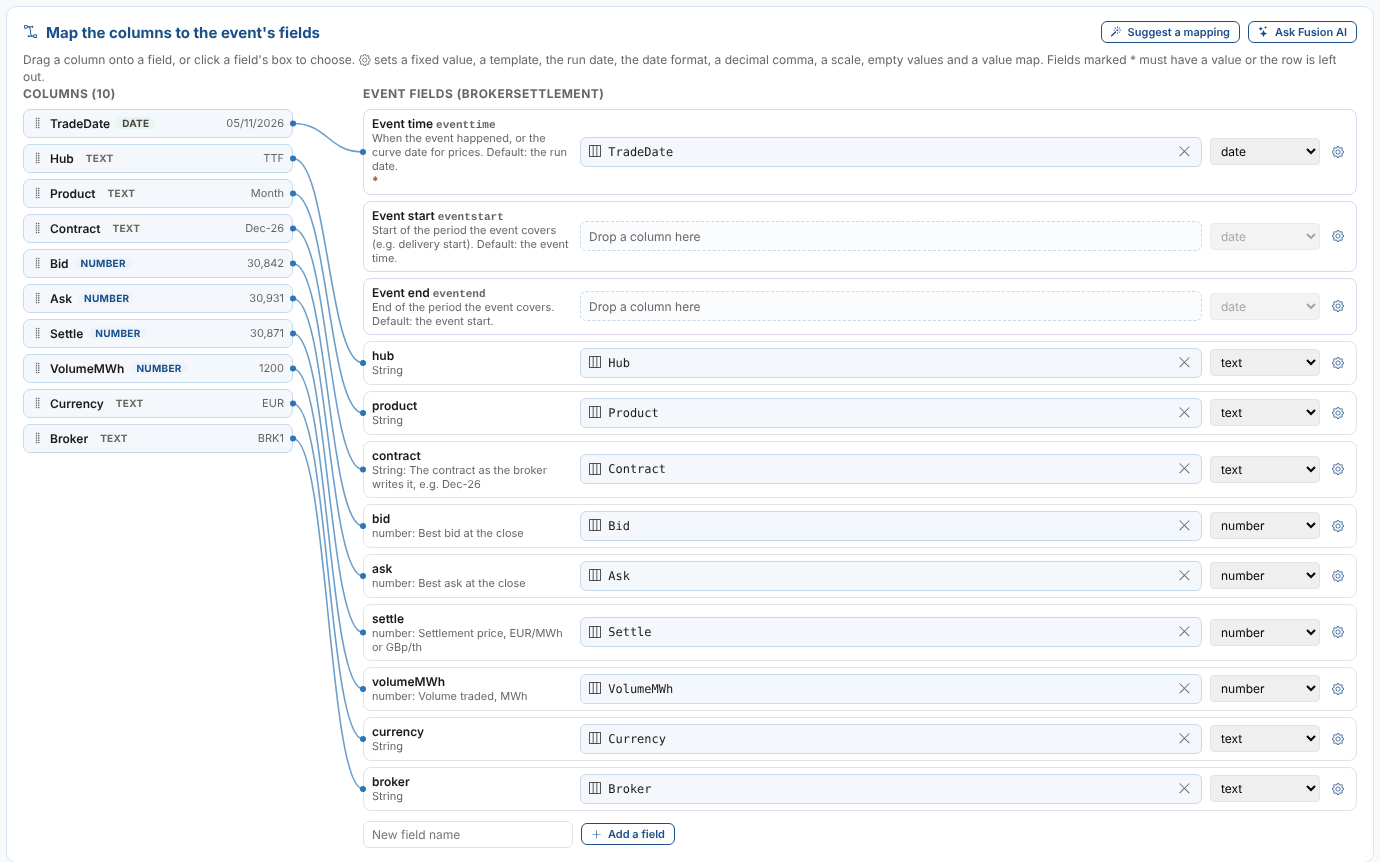
The tactical way to bring in a file, an API, a web page table or a spreadsheet quickly: build the loader on screen with the data in front of you, deploy it on a schedule or upload by hand, and have it running the same day.
The Gap Between Needing Data and Having It
The Challenge
The data your business runs on every day belongs in a managed feed or the Data Catalogue. But there is always a source that is needed now:
- A new broker's end of day settlements file
- A client's monthly price workbook
- Government statistics such as EIA stocks or e-Stat prices
- Prices published in a table on a supplier's web page
Each one is too small to be a project, so it waits for a developer to write a script, or ends up in someone's spreadsheet, copied in by hand.
Our Solution
Data Loaders gets that source into the platform quickly, without a project. Point it at the source, see a real sample, map its columns to your fields with a line from one to the other, and deploy.
The loader runs on a schedule straight away, with a report of every run, alerts when a source goes missing, and a stage that shows where it is from sandbox to production.
Fusion AI proposes the mapping from the sample, so most loaders take minutes, not days.
Data Loaders: In Today, Scheduled Tonight
Key Benefits
A quick, reliable way in for every source that cannot wait for a managed feed.
Fast
Minutes, not a project.
Build, check and deploy a loader in one sitting, with the sample in front of you at every step and Fusion AI to propose the mapping.
Scheduled From Day One
Not a one-off import.
Weekdays at 18:30, hourly, monthly or any schedule, with a holiday calendar. Load years of history in a single run, then keep it up to date.
Any File or API
Six kinds of source, or a workbook.
CSV and text files, JSON APIs, XML documents, Excel workbooks and tables on web pages, or your own ODSL for anything else, with secrets kept in the secret store. No URL? Drop the workbook on the page.
Handles Messy Sources
No clean-up script.
A product in every column, only the columns you need, totals under a blank row, decimal commas, Japanese dates and names: all handled on screen.
Safe to Run Again
No duplicates.
Each event's id is built from its time and the fields that make a row unique, so loading a file again replaces its events instead of adding copies.
Monitored
Every run recorded.
Each run's report shows the rows read, the events saved and the rows left out. A failed run raises an alert, and the Data Loader Runs insight shows them all.
How Data Loaders Work
Get It In
Extract: choose the kind of source and its URL, which can contain the date being loaded, variables and secrets. Take a sample, or extract all of it.
Examine: the rows of the sample and what each column holds, with the columns to use and the shape of the data.
Event type: choose one, or define a new one from the columns.
Map: join each column to a field, or let Fusion AI propose it, and preview the events before anything is saved.
Keep It Coming
Deploy: saves a workflow of the standard extract, transform, load and report actions, and a process that runs it.
Schedule: any schedule, in the time zone you choose, with a holiday calendar.
Run now: load today, an earlier date, or the whole history in one go.
Series: make event timeseries, curves and your team's standard sets of series on every record the loader fills.
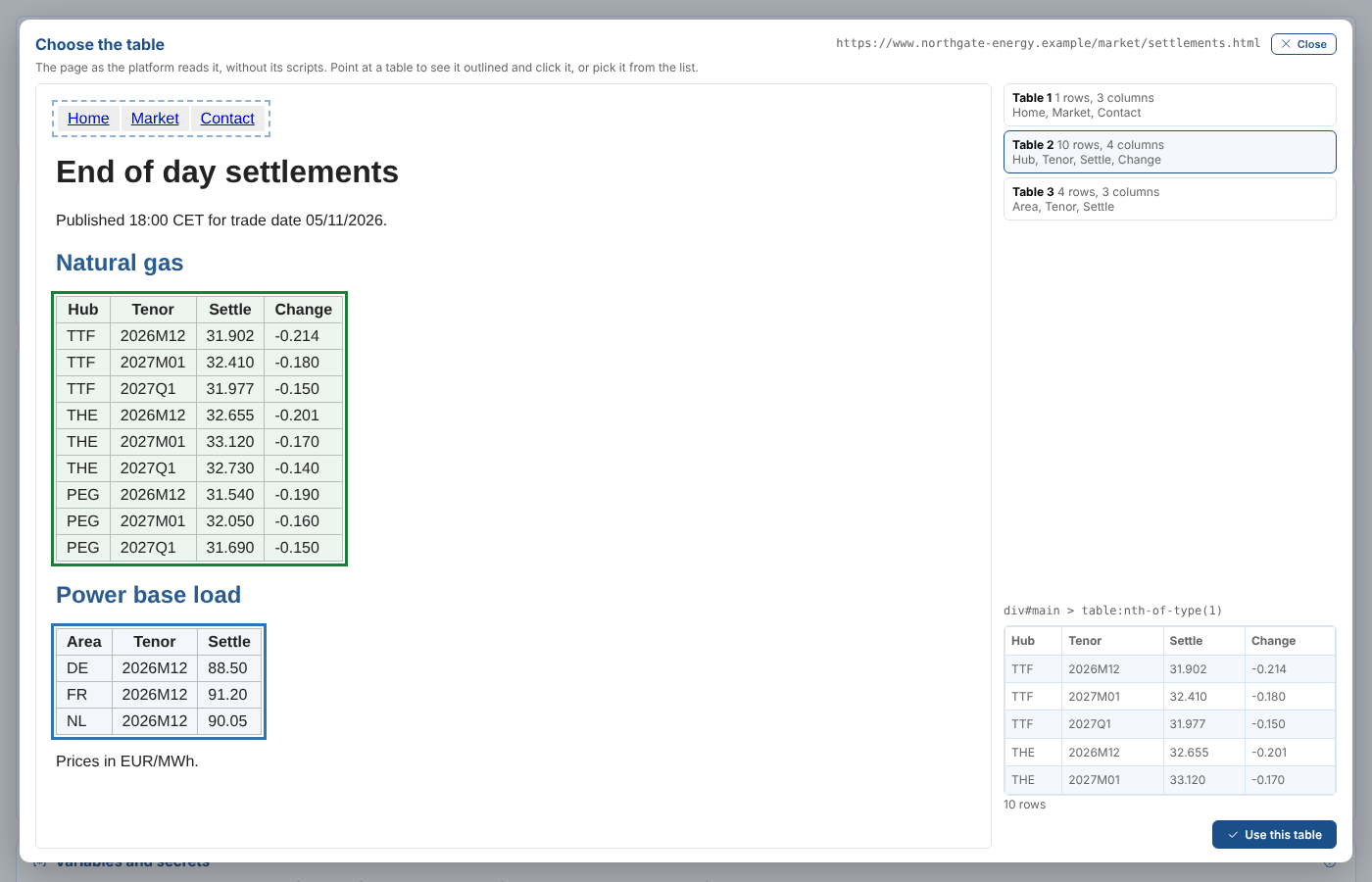
Loading a table from a web page: click the table, and the platform reads it the same way every run.
Spreadsheets Uploaded by Hand
Describe It Once
Some data never comes from a URL: a client's workbook, or a report someone downloads each month. A spreadsheet upload loader describes the workbook once, in either of two layouts:
- Three sheets: dataset information, a row for each master data record, and the values by date
- One sheet, a row for each value: the properties, the date and the value in each row, from a heading row you choose
Choose the master data type, event type and set of series, build the master data and event _id from templates, add more properties to every record, and calculated fields such as a real price from a conversion factor.
Drop It Each Time
From then on, anyone drops the latest workbook on the page. The preview shows every master data record, new or already there, with its properties and events, before anything is saved.
Then one click loads the records, the events and the series. Nothing is scheduled: the workbook drives it all, and the loader keeps a list of its uploads.
No URL, No Script, No Problem
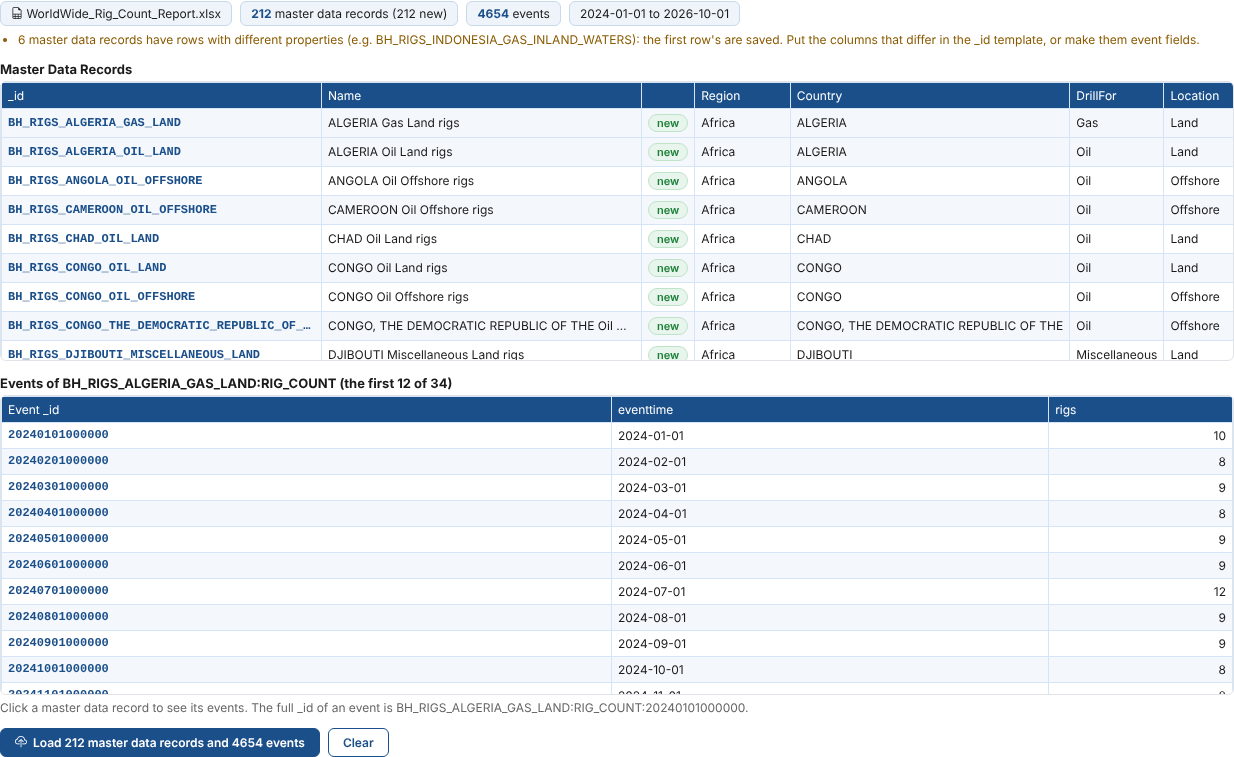
A monthly rig count report dropped on the page: a master data record for each country, fuel and location, and an event for each month.
Real-World Applications
Sources that energy and commodity teams get in quickly with Data Loaders.
A New Broker's Settlements
A second broker starts sending a semicolon separated file of gas settlements. A loader has it on the platform the same evening, every weekday at 18:30, with the decimal commas and contract names handled.
Government Statistics
Load decades of EIA stock levels, a series for each column, as a history load, then keep them up to date every month. Upload the monthly rig count report by hand, a record for each country, fuel and location.
A Client's Monthly Workbook
Drop the client's workbook on the page each month: a record for each product with its properties, the values by month, a real price calculated from a conversion factor, and the client's standard set of price, unit and currency series on every product.
Prices From a Web Page
Pick the table of metal prices on a public web page, turn the date and AM or PM marker into the event time and name, and load it every morning.
Integration with Platform Capabilities
Tactical data, with everything the rest of the platform offers
Get It In Now, Decide Later
Data Loaders turns a new source from a request in a queue into a scheduled loader the same day, built by the people who know the data.
Start it in the sandbox, move it to production when the business relies on it, and if it grows into a strategic feed, the mapping, the types and the series are already on the platform.
Load a Source This Week
Book a demo and we will build and schedule a loader for one of your own files or APIs while you watch.
Get Started TodayValidation
How about a demo?
Our team is here to find the right solution for you, contact us to see this in action.
Fill out your details below and somebody will be in contact with you very shortly.